
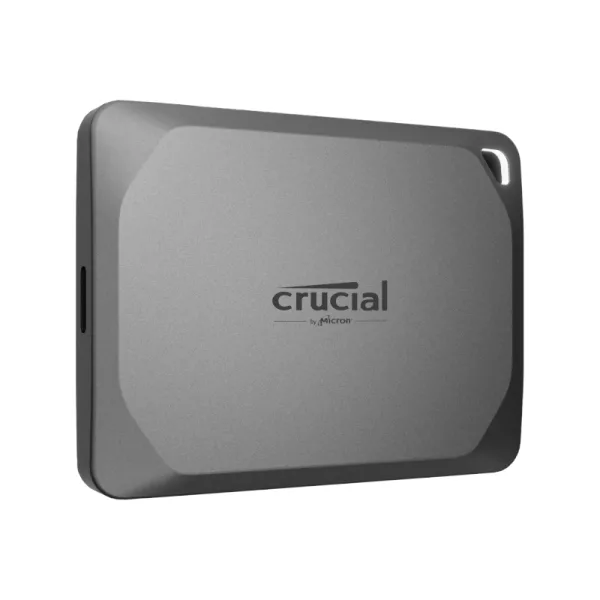



Crucial X9 Pro 1TB Type-C Portable SSD
[embed]https://youtu.be/Cs7KL6UWpiQ?si=BI6dkB0QDGn1E3eS[/embed] Accelerate your workflow with the powerful performance of the Crucial® X9 Pro Portable SSD. With read and write speeds up to 1,050MB/s and up to 1TB of capacity, the X9 Pro has space for thousands of photos, files, and videos, along...
Get Notified When Available
Enter your email and we'll notify you when this item is back in stock.
Frequently Bought Together
[embed]https://youtu.be/Cs7KL6UWpiQ?si=BI6dkB0QDGn1E3eS[/embed]
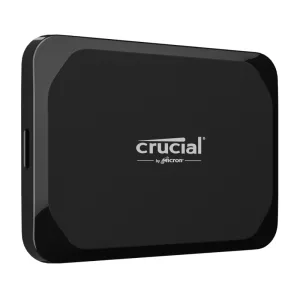
Accelerate your workflow with the powerful performance of the Crucial® X9 Pro Portable SSD. With read and write speeds up to 1,050MB/s and up to 1TB of capacity, the X9 Pro has space for thousands of photos, files, and videos, along with the speed you need to organise, curate, edit, and retouch your portfolio quickly, supporting whatever you do in Adobe® Lightroom®. The Crucial X9 Pro is plug-and-play ready with a USB Type-C connection and works with Windows, Mac, Android, and more. Featuring Micron® TLC NAND and water and dust resistance (IP55), the Crucial X9 Pro is designed for durability and style in the studio, in the field, or wherever you roam.
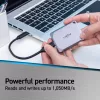
With read and write speeds up to 1,050 MB/s, the Crucial X9 Pro Portable SSD is powerful enough for editing directly from the drive. Get more done with high sustained performance of up to 1,050 MB/s reads and 975 MB/s writes throughout the drive’s capacity.
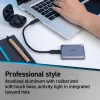
The X9 Pro offers plug-and-play compatibility with Windows, Mac, Android, iPad, PC, Linux®, PlayStation®, and Xbox® gaming consoles via an included USB Type-C cable. Protect sensitive data in the studio, in the field, or while travelling with password protection and 256-bit AES hardware encryption. Engineered by Micron®, the Crucial X9 Pro Portable SSD comes in anodized aluminium with a rubberized soft-touch base in a mini 65 x 50 mm design that includes a drive activity light in the integrated lanyard hole.
FEATURES:
- 1TB (1000GB) storage capacity
- Fast transfer speeds, reads and writes up to 1,050MB/s
- A compact, lightweight, and portable design works with your favourite devices
- Durable design with IP55 water and dust resistance
- Backed by Micron, one of the largest manufacturers of flash storage in the world
- Widely compatible with laptops, tablets, phones, and more
SPECIFICATIONS:
- Capacity: 1TB (1000GB)
- Sequential Read: Up to 1,050MB/s
- Sequential writes: 1,050MB/s
- Raw capacity: 1,024GB
- Form factor: External Portable
- Interface: USB 3.2 Gen2 (10 GB/s)
- Power Usage: USB bus-powered (5V/1A required)
- Dimensions: 5.0 x 6.5 x 10 cm
- Weight: 38g
WHAT’S IN THE BOX:
- Crucial X9 Portable SSD 1TB - Grey x1
- Quick-Start Guide
| Brand | Crucial |
| Colour | - |
| Form Factor | - |
| Interface | - |
| Capacity | - |
| Memory Capacity | - |
| Screen Size | - |
| Resolution | - |
| Refresh Rate | - |
| Cpu | - |
| Cpu Socket | - |
| Warranty | 60 Months |
No reviews yet. Be the first to review this product!
Related Products
Share this product
' + '' + '' + ''; modal.appendChild(content); function closeModal() { if (modal.parentNode) modal.parentNode.removeChild(modal); } modal.addEventListener('click', function(e) { if (e.target === modal) closeModal(); }); content.querySelector('[data-action="close-modal"]').addEventListener('click', closeModal); var copyBtn = content.querySelector('[data-action="copy-link"]'); var copyLabel = copyBtn.querySelector('.btn-label'); copyBtn.addEventListener('click', function() { function flashLabel(text) { var prev = copyLabel.textContent; copyLabel.textContent = text; setTimeout(function() { copyLabel.textContent = prev; }, 1800); } if (navigator.clipboard && navigator.clipboard.writeText) { navigator.clipboard.writeText(url) .then(function() { flashLabel('Copied!'); }) .catch(function() { flashLabel('Press Ctrl+C'); }); } else { // Legacy browser fallback — execCommand still works on http: contexts var ta = document.createElement('textarea'); ta.value = url; ta.style.position = 'fixed'; ta.style.opacity = '0'; document.body.appendChild(ta); ta.select(); try { document.execCommand('copy'); flashLabel('Copied!'); } catch (e) { flashLabel('Press Ctrl+C'); } document.body.removeChild(ta); } }); document.body.appendChild(modal); }