
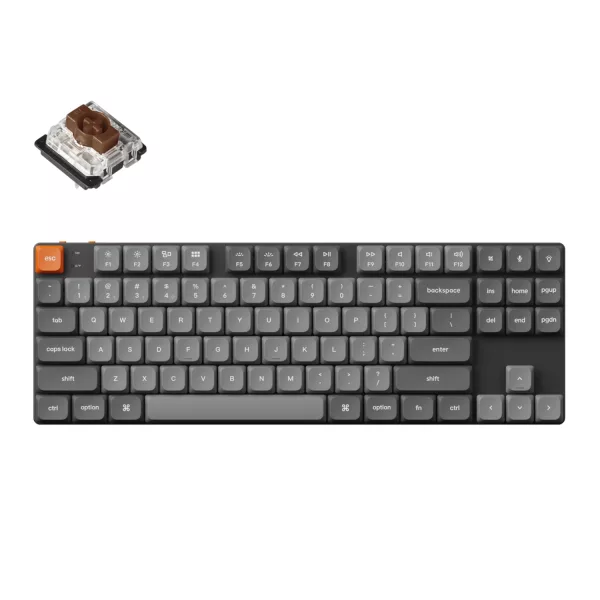

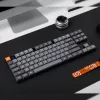
Keychron K1 Max QMK/VIA 80% Wireless Custom Mechanical Keyboard | BROWN Switches
The Keychron K1 Max QMK/VIA Low Profile Wireless Custom Mechanical Keyboard is a cutting-edge, ultra-slim TKL (80%) mechanical keyboard designed for seamless wireless and wired connectivity. With support for 2.4GHz, Bluetooth 5.1, and USB Type-C wired connections, it offers versatility for both...
Frequently Bought Together
The Keychron K1 Max QMK/VIA Low Profile Wireless Custom Mechanical Keyboard is a cutting-edge, ultra-slim TKL (80%) mechanical keyboard designed for seamless wireless and wired connectivity. With support for 2.4GHz, Bluetooth 5.1, and USB Type-C wired connections, it offers versatility for both work and play. The Keychron Launcher web app allows users to remap keys, program macros, and fine-tune their setup for a fully customized experience. Built with LSA (low-profile spherical-angled) keycaps for both macOS and Windows, it ensures a comfortable and intuitive typing experience straight out of the box.
Engineered for high-performance gaming and professional use, the 2.4GHz wireless mode delivers an ultra-fast 1000Hz polling rate, ensuring near-zero latency even in competitive settings. The low-profile Gateron Jupiter Brown switches, which are 31% slimmer than standard mechanical switches, provide a responsive, tactile feel while maintaining a sleek and lightweight design. For those who love customization, the hot-swappable version enables effortless switch swapping without the need for soldering, giving users full control over their typing experience.
The K1 Max is powered by QMK/VIA firmware, offering limitless customization possibilities, including key remapping, shortcuts, and macros. The ARM Cortex-M4 32-bit MCU with 256KB Flash ensures smooth performance and long-term reliability. Designed for comfort, the keyboard features IXPE acoustic foam for silent keystrokes, latex foam for enhanced switch support, and redesigned stabilizers to minimize wobble on larger keys like space bar, Shift, Enter, and Backspace. These refinements contribute to a quieter, more stable, and premium typing experience.
Aesthetically, the K1 Max boasts double-shot PBT keycaps, offering oil resistance and durability for long-term use. The keyboard features more than 22 types of RGB backlight effects (with additional fine-tuning for hue, brightness, and speed), as well as a white backlight option for a more subtle look. With a 2000mAh battery, it provides up to 95 hours of use with backlight off or 50 hours on the lowest brightness RGB setting, ensuring long-lasting wireless performance. Whether for productivity, gaming, or daily use, the Keychron K1 Max sets a new standard for low-profile mechanical keyboards.
FEATURES:
- Customisable keyboard with 80% layout
- 2.4GHz & Bluetooth connection
- QMK/VIA Support
- Double-shot PBT keycaps
- Ultra-slim design
- Hot-swappable
- RGB LED lights
- Low profile Gateron Jupiter BROWN switches
- Screw-in PCB stabilisers
SPECIFICATIONS:
- Colour: Black
- Number of Keys: 87 (80%)
- Switches: Gateron low-profile mechanical
- Switch Face: North-facing
- Number of Multimedia Keys: 12
- Frame Material: ABS + Aluminium frame
- Keycap Material: Low-profile double-shot PBT
- Layout: ANSI
- Polling Rate (2.4GHz and Wired Mode): 1000Hz
- Polling Rate (BT Mode): 90Hz
- N-Key Rollover (NKRO): Yes for both wireless and wired modes
- Backlit: 22 types of RGB backlight options plus endless possibilities
- Battery: 2000 mAh rechargeable li-polymer battery
- Wireless Working Time (Backlit off): Around 95 hours (Lab test result may vary by actual use)
- Wireless Working Time (RGB): Around 50 hours (Lowest brightness)
- Connection: 2.4 GHz / Bluetooth / Type-C wired
- Bluetooth version: 5.1
- Bluetooth Device Name: Keychron K1 Max
- Compatible System: macOS / Windows / Linux
- Typing Angle: 3.37º, 4.2º and 6.7º
- MCU: ARM Cortex-M4 32-bit STM32F402 (256KB Flash)
- Operating Environment: -10 to 50℃
- Gateron Jupiter BROWN Switch:
- Operating force: 55 ± 15 gf
- Pre-travel: 1.7 ± 0.4mm
- Travel distance: 3.0 ± 0.2mm
- Behavior: Tactile
- Pre-lubed: Yes
- Sound level: Medium
- Suitable for: Midway Office/gaming
- Product Dimensions: 34.6 x 11.8 x 1.8~2.4 cm
- Product Weight: 608g
WHAT’S IN THE BOX:
- Keychron K1 Max QMK/VIA Low Profile Wireless Custom Mechanical Keyboard | BROWN Switches – Black x1
- Type-A to Type-C Cable x1
- Extension Adapter for Receiver x1
- Type-A 2.4GHz Receiver x1
- Keycap & Switch Puller x1
| Brand | Keychron |
| Colour | Black |
| Form Factor | - |
| Interface | - |
| Capacity | - |
| Memory Capacity | - |
| Screen Size | - |
| Resolution | - |
| Refresh Rate | - |
| Cpu | - |
| Cpu Socket | - |
| Warranty | 24 Months |
No reviews yet. Be the first to review this product!
Related Products

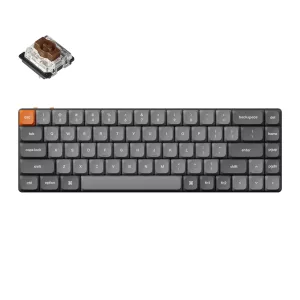
Keychron K7 Max QMK/VIA 65% Wireless Custom Mechanical Keyboard | BROWN Switches
Save R 622.92
In Stock
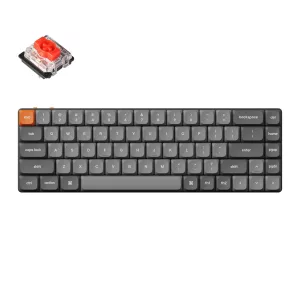
Keychron K7 Max QMK/VIA 65% Wireless Custom Mechanical Keyboard | RED Switches
Save R 622.92
In Stock

Keychron V3 Max QMK/VIA 80% Wireless Custom Mechanical Keyboard (Brown Switch) – Carbon Black
Save R 560.63
In Stock