OWC
OWC 5 Piece Mini Toolkit
R 74.02
Out of Stock
Five Tools For Installing Memory & Drives Phillips #00 Screwdriver Torx T6 & T8 Screwdrivers
Get Notified When Available
Enter your email and we'll notify you when this item is back in stock.
Free shipping over R 3 450.00
Secure checkout
14-day returns
Expert support
Secure checkout via PayFast · SSL encrypted
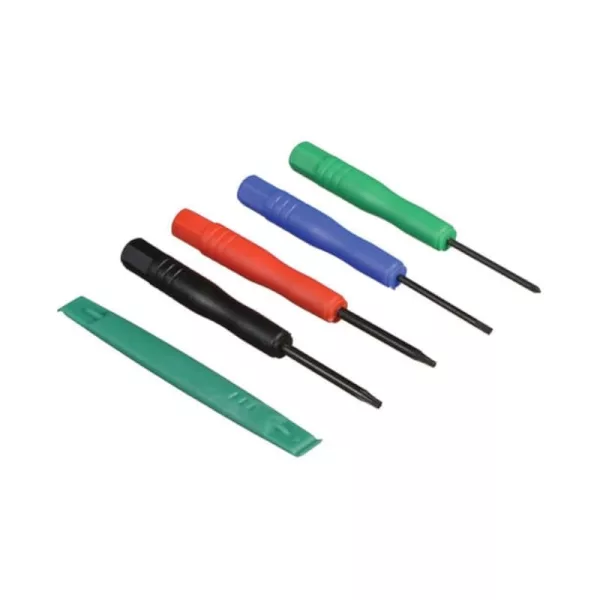
The 5-Piece Mini Toolkit from Other World Computing is a set of five tools to help you repair and service various devices and small appliances, including installing memory and drives into most laptops, desktops, and tower computers. The set includes a Phillips #00 screwdriver, Torx T6 and T8 screwdrivers, a 1.8mm flat-head screwdriver, and a nylon pry tool (spudger). The small size set is perfect for smaller devices that require smaller bits for dissassembly.
FEATURES
- Five in 1 Toolkit
- For Installing Memory & Drives
- Phillips #00 Screwdriver
- Torx T6 & T8 Screwdrivers
- Nylon Spudger tool included
SPECIFICATIONS:
- Included Tools: Phillips #00 Screwdriver, Torx T6, Torx T8, Flat 1.8mm Screwdriver and Nylon Pry Tool(Spudger)
- Colour: Multi- coloured
- Compatibility: Most laptops and Desktops
WHAT'S IN THE BOX:
- OWC Phillips #00 Screwdriver x1
- OWC Torx T6 Screwdriver x1
- OWC Torx T8 Screwdriver x1
- OWC 1.8mm Flat-head Screwdriver x1
- Nylon Spudger Tool x1
| Brand | OWC |
| Colour | - |
| Form Factor | - |
| Interface | - |
| Capacity | - |
| Memory Capacity | - |
| Screen Size | - |
| Resolution | - |
| Refresh Rate | - |
| Cpu | - |
| Cpu Socket | - |
| Warranty | 12 Months |
0 reviews
No reviews yet. Be the first to review this product!