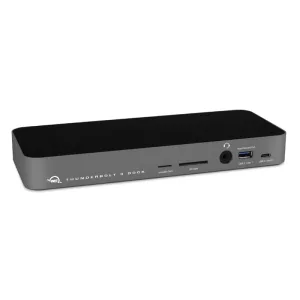
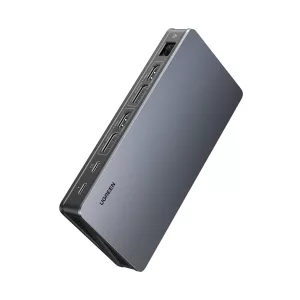
PORT Mobile docking station 1 X 4K USB-C 7 devices 100W
7 ports from a single USB-C connection | 4K output via HDMI 2.0 or DisplayPort 1.2 | 100W Power Delivery to your laptop | Gigabit Ethernet for stable wired networking | Plug & Play — no drivers needed
7 ports from a single USB-C connection | 4K output via HDMI 2.0 or DisplayPort 1.2 | 100W Power Delivery to your laptop | Gigabit Ethernet for stable wired networking | Plug & Play — no drivers needed
The PORT Connect Mobile Docking Station is built for professionals who need a full workstation from a single cable. Connect up to 7 peripherals simultaneously — including an external 4K display via HDMI 2.0 or DisplayPort 1.2, two USB-A 3.1 Gen 1 ports (5 Gbps), two USB-C 3.1 Gen 2 ports (10 Gbps), and a Gigabit Ethernet RJ-45 port — all through one USB-C connection to your laptop. Up to 100W USB-C Power Delivery keeps your laptop charged while you work, though a power outlet connection is required for laptop charging via Power Delivery. Plug & Play setup means no drivers or complex configuration, and the integrated 30 cm USB-C cable is sized for clean, clutter-free desk use. Compatible with Windows, macOS, and ChromeOS, and supporting PXE Boot and Wake-on-LAN for remote IT management, this compact travel docking station is as capable in a flex office as it is in a hotel room. Backed by a 36-month warranty.
Instantly extend your laptop connectivity
The PORT Connect USB-C mobile docking station transforms a single USB-C port into a complete professional solution to structure your workspace. It allows you to connect multiple devices and an external display simultaneously while centralising connectivity in a compact and elegant format. Ideal for professionals on the move as well as flexible workstations, it simplifies installation with a single cable connecting your laptop to all peripherals. Compatible with Windows®, macOS® and ChromeOS™, it integrates easily into modern IT environments.
4K Ultra HD display for optimal visual quality
Enjoy high-definition video output up to 4K via HDMI 2.0 or DisplayPort™. This flexibility allows you to adapt your configuration according to your display equipment and professional needs. Whether for multitasking, data analysis, presentations or graphic work, 4K resolution ensures sharp, smooth and comfortable visuals for intensive professional use.
100W Power Delivery and high-speed connectivity
Featuring USB-C Power Delivery™ up to 100W, the docking station efficiently charges the connected laptop while powering peripherals. Laptop charging via USB-C Power Delivery™ requires the docking station to be connected to a power outlet. It allows connection of up to 7 peripherals thanks to comprehensive connectivity including HDMI 2.0, DisplayPort™, two USB-A 3.1 Gen 1 ports (5 Gbps), two USB-C 3.1 Gen 2 ports (10 Gbps) and a Gigabit Ethernet RJ-45 port. This architecture ensures fast data transfer, stable network connection and optimal workstation organization.
Designed for IT environments and professional mobility
Built to meet enterprise requirements, the station supports PXE Boot and Wake-on-LAN for remote IT management. Its Plug & Play installation ensures quick setup without complex configuration. The integrated 30 cm USB-C cable provides ideal length for laptop use while maintaining a clean desk. Its compact format makes it easy to transport and an essential tool for mobile professionals. Backed by a 3-year warranty, it reflects PORT Connect reliability and quality commitment.
Features
- Connects up to 7 peripherals through a single USB-C port — eliminating cable clutter at your desk
- 4K video output up to 4K@30Hz via HDMI 2.0 or DisplayPort 1.2 — choose the output that suits your display
- 100W USB-C Power Delivery charges your laptop while all peripherals remain connected (AC power connection required)
- Two USB-C 3.1 Gen 2 ports (10 Gbps) and two USB-A 3.1 Gen 1 ports (5 Gbps) for fast data transfer
- Gigabit Ethernet (10/100/1000 Mbps) for a stable, high-speed wired network connection
- PXE Boot and Wake-on-LAN support for remote IT management in enterprise environments
- Plug & Play installation — compatible with Windows, macOS, and ChromeOS
- Compact travel format with integrated 30 cm USB-C cable — easy to carry, clean to use
Specifications
- Brand: PORT Connect
- Colour: Black
- Warranty: 36 Months
- Product Weight: 100g
- Product Dimensions (L x W x H): 12.4 x 5.5 x 1.7 cm
- Host Connector: USB Type-C
- Total Ports: 7
- Port Selection:
- 1x HDMI 2.0,
- 1x DisplayPort 1.2,
- 2x USB-A 3.1 Gen 1 (5 Gbps),
- 2x USB-C 3.1 Gen 2 (10 Gbps),
- 1x RJ-45 Gigabit Ethernet
- Max Display Output: 4K@30Hz via HDMI 2.0 or DisplayPort 1.2
- Power Delivery to Host: 100w
- Ethernet Speed: Gigabit (10/100/1000Mbps)
What's in the Box
- PORT Connect Mobile Docking Station USB-C 1x4K — Black x1
- User Manual x1
Why PORT Connect
The PORT Connect USB-C 1 x 4K 100W mobile docking station is a compact, powerful and versatile solution to centralise power, display and connectivity. Designed for mobility and IT integration, it enhances productivity with a single cable. A reliable and high-performance professional docking station tailored to modern business needs.
| Brand | Port |
| Colour | Black |
| Form Factor | - |
| Interface | - |
| Capacity | - |
| Memory Capacity | - |
| Screen Size | - |
| Resolution | - |
| Refresh Rate | - |
| Cpu | - |
| Cpu Socket | - |
| Warranty | 36 Months |
No reviews yet. Be the first to review this product!