Redragon HA300 Scepter Pro RGB Headset Stand with USB Hub (4 x USB 2.0, RGB Lighting) - Redragon | DirectTech
Secure SSL Payment
Free Shipping over R3,450
14-Day Returns
Expert Support
Redragon

Redragon HA300 Scepter Pro RGB Headset Stand with USB Hub (4 x USB 2.0, RGB Lighting)

SKU: RD-HA300
R 399.00
In Stock

The Redragon HA300 Scepter Pro Headset Stand is a multifunctional desktop accessory engineered to optimise your workspace while enhancing your aesthetic environment. Featuring a sleek, minimalistic frame and ambient RGB lighting, it offers a refined solution for headset storage, desk organisation,...

Free shipping over R 3 450.00
Secure checkout
14-day returns
Expert support

Frequently Bought Together

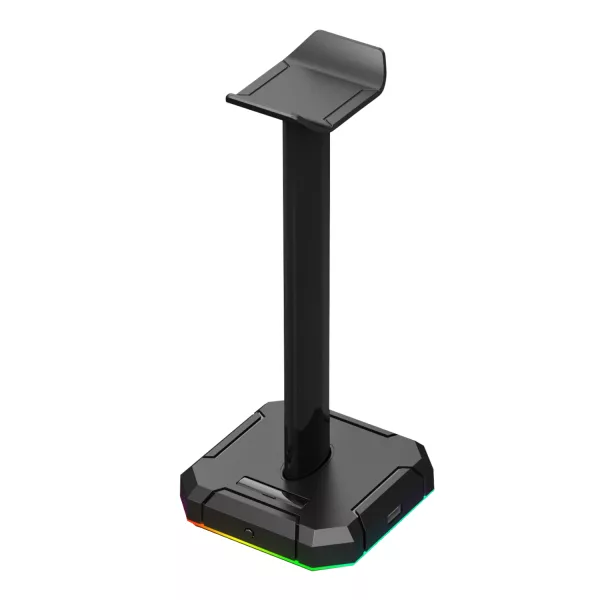
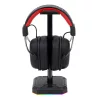
The Redragon HA300 Scepter Pro Headset Stand is a multifunctional desktop accessory engineered to optimise your workspace while enhancing your aesthetic environment. Featuring a sleek, minimalistic frame and ambient RGB lighting, it offers a refined solution for headset storage, desk organisation, and USB expansion—all in one.

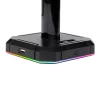
Purpose-built for modern PC users and gamers, the HA300 Scepter Pro includes four USB 2.0 ports (two front-facing, two side-mounted with protective covers), ensuring seamless connectivity for essential peripherals such as keyboards, mice, USB drives, and more. Its integrated Type-C power input delivers reliable, efficient energy distribution while preventing cable drag and maintaining tidy cable routing across your setup.

The stand’s 21.6 cm vertical support bar, constructed from durable ABS, accommodates all standard gaming and office headsets while preserving structural integrity over time. Non-slip rubber pads ensure steady placement on smooth surfaces, offering stability during daily use or high-performance gaming sessions.

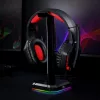
Customisable RGB backlighting adds a bold visual element, featuring 10 lighting presets to match your mood or gaming rig. For a more discreet appearance, users can disable the lighting entirely. With intuitive design choices like protective port covers and foam-based grip pads, the Redragon HA300 blends utility with premium styling, elevating both form and function.

Ideal for gamers, streamers, content creators, and professionals seeking a cohesive, clutter-free environment, the Redragon Scepter Pro is a compact powerhouse that does more than hold your headset.

FEATURES:

  • RGB headset stand with 10 lighting modes
  • 4 x USB 2.0 ports for extended connectivity
  • Dust-resistant swirl covers on side ports
  • Durable ABS build with stable, non-slip base
  • 24.6 cm height – compatible with most headsets
  • Type-C powered (cable included)
  • Sleek black design suited to gaming setups
  • Centralised cable management support

SPECIFICATIONS:

  • Product Dimensions: 43.94 x 15 x 4.06 cm
  • USB Ports: 4 x USB 2.0 (2 front, 2 side)
  • Power Input: Type-C port (Type-C cable included)
  • Lighting: 10 RGB presets (adjustable/on-off)
  • Height: 21.6 cm
  • Material: ABS plastic
  • Base: Natural foam rubber pads x4 (non-slip)
  • Compatibility: Universal headset fitment

WHAT'S IN THE BOX:

  • Redragon HA300 Scepter Pro RGB Headset Stand with USB Hub x1
  • Type-C Power Cable x1
  • User Manual x1
Brand Redragon
Colour -
Form Factor -
Interface -
Capacity -
Memory Capacity -
Screen Size -
Resolution -
Refresh Rate -
Cpu -
Cpu Socket -
Warranty 18 Months
0.0
0 reviews
Login to Review

No reviews yet. Be the first to review this product!
Related Products

WINX DO Ergo Adjustable Laptop Stand
WINX

WINX DO Ergo Adjustable Laptop Stand

R 299.00

In Stock

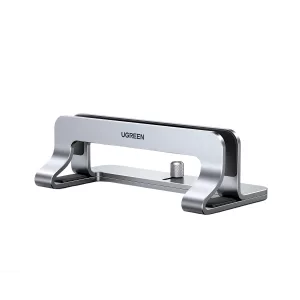
UGREEN Aluminium Adjustable Laptop Stand
Ugreen

UGREEN Aluminium Adjustable Laptop Stand

R 459.00

Out of Stock

// Share product with fallback // 2026-05-22: rewritten. Old version had three bugs: // 1) Copy Link button used `this.textContent='Copied!'` which destroyed the // icon (textContent replaces everything). After clicking, the link icon // disappeared. // 2) Inline onclick handlers had nested \x27-escaped strings interpolating // `url` directly — if the URL contained a single quote the JS broke. // 3) Close button used `this.closest('div[style]').parentElement.remove()` // — fragile, depends on no inline style elsewhere in the DOM tree. // New version: build with DOM nodes, attach proper event listeners, keep the // icon, gracefully handle clipboard failure, use a held reference to close. function shareProduct() { var title = document.querySelector('.product-title').textContent; var url = window.location.href; if (navigator.share) { navigator.share({ title: title, url: url }).catch(function() {}); return; } // Fallback: show share options modal var modal = document.createElement('div'); modal.style.cssText = 'position:fixed;top:0;left:0;right:0;bottom:0;background:rgba(0,0,0,0.6);z-index:9999;display:flex;align-items:center;justify-content:center;padding:1rem;'; var encoded = encodeURIComponent(url); var encodedTitle = encodeURIComponent(title); var content = document.createElement('div'); content.style.cssText = 'background:#fff;border-radius:12px;padding:24px;max-width:360px;width:100%;text-align:center;'; content.innerHTML = '

Share this product

' + '
' + ' Facebook' + ' WhatsApp' + ' Email' + '
' + '' + '
'; modal.appendChild(content); function closeModal() { if (modal.parentNode) modal.parentNode.removeChild(modal); } modal.addEventListener('click', function(e) { if (e.target === modal) closeModal(); }); content.querySelector('[data-action="close-modal"]').addEventListener('click', closeModal); var copyBtn = content.querySelector('[data-action="copy-link"]'); var copyLabel = copyBtn.querySelector('.btn-label'); copyBtn.addEventListener('click', function() { function flashLabel(text) { var prev = copyLabel.textContent; copyLabel.textContent = text; setTimeout(function() { copyLabel.textContent = prev; }, 1800); } if (navigator.clipboard && navigator.clipboard.writeText) { navigator.clipboard.writeText(url) .then(function() { flashLabel('Copied!'); }) .catch(function() { flashLabel('Press Ctrl+C'); }); } else { // Legacy browser fallback — execCommand still works on http: contexts var ta = document.createElement('textarea'); ta.value = url; ta.style.position = 'fixed'; ta.style.opacity = '0'; document.body.appendChild(ta); ta.select(); try { document.execCommand('copy'); flashLabel('Copied!'); } catch (e) { flashLabel('Press Ctrl+C'); } document.body.removeChild(ta); } }); document.body.appendChild(modal); }
Chat with us!