
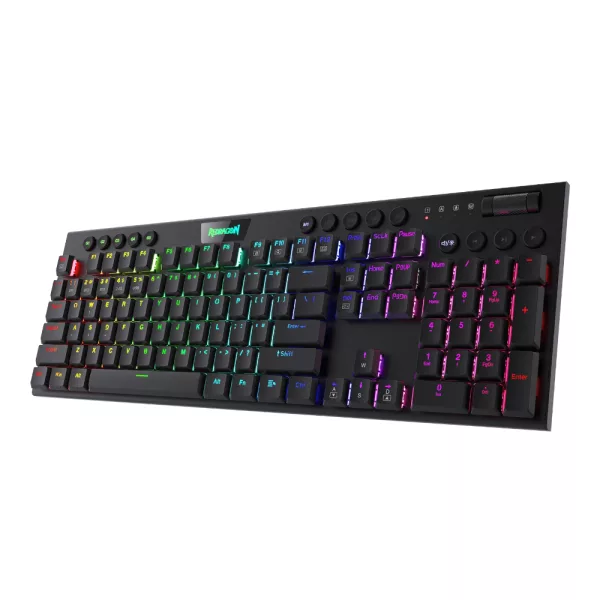
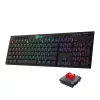
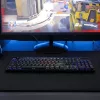
REDRAGON MECHANICAL HORUS PRO Wireless Gaming Keyboard - Redragon | DirectTech
Secure SSL Payment
Free Shipping over R3,450
14-Day Returns
Expert Support
Redragon

REDRAGON MECHANICAL HORUS PRO Wireless Gaming Keyboard

SKU: RD-K618RGB-PRO
R 749.00 R 949.00
You save R 200.00 (21%)
Out of Stock
You save R 200.00 (21% off)

Elevate your gaming experience with the Redragon K618 HORUS PRO, an ultra-thin, low-profile mechanical keyboard designed to deliver seamless performance across all your devices. With Redragon's innovative 1st-Gen 3-mode connection technology, you can effortlessly switch between wired, Bluetooth...

Get Notified When Available

Enter your email and we'll notify you when this item is back in stock.

Free shipping over R 3 450.00
Secure checkout
14-day returns
Expert support

Frequently Bought Together

Elevate your gaming experience with the Redragon K618 HORUS PRO, an ultra-thin, low-profile mechanical keyboard designed to deliver seamless performance across all your devices. With Redragon's innovative 1st-Gen 3-mode connection technology, you can effortlessly switch between wired, Bluetooth 3.0/5.0, and 2.4GHz wireless modes, ensuring no latency, and real wireless connectivity wherever you go. Whether gaming, working, or streaming, the K618 adapts to your needs, allowing you to connect up to five devices simultaneously for ultimate convenience.

The K618 features Redragon's low-profile RED switches, designed for precision and speed, with a reduced actuation distance to enhance your response time. This keyboard is not just about performance; it's also about customisation and control. Equipped with five on-the-fly macro keys, a dedicated media control area, and a convenient Win/Mac switch button, the K618 provides all the tools you need to tailor your experience. Powered by a long-lasting 1900mAh battery, the Redragon HORUS PRO guarantees up to 30 hours of uninterrupted gaming.

FEATURES:

  • Tri-Mode Ultra-Thin Low Profile Gaming Keyboard
  • Low Profile RED Switches
  • 30% Cutted Ultra-Thin with Dedicated Media Control
  • Professional Software Support
  • 5 macro keys
  • RGB Backlit
  • 1900mAh battery (30 hours)

SPECIFICATIONS:

  • Colour: Black
  • Layout: US QWERTY
  • Switches: Low Profile RED Switches
  • Keyboard Connectivity: Tri-mode (Bluetooth/2.4Ghz/Wired)
  • Number of Keys: 104 Keys (Full Rollover)
  • USB Connector: USB 2.0
  • Product Dimensions: 43.7 x 14.7 x 1.7 cm
  • Product Weight: 725g

WHAT'S IN THE BOX:

  • Redragon HORUS PRO RGB 104-Key RGB Mechanical Gaming Keyboard - Black x1
Brand Redragon
Colour Black
Form Factor -
Interface -
Capacity -
Memory Capacity -
Screen Size -
Resolution -
Refresh Rate -
Cpu -
Cpu Socket -
Warranty 18 Months
0.0
0 reviews
Login to Review

No reviews yet. Be the first to review this product!

Related Products

-21%
REDRAGON MECHANICAL DEIMOS WIRELESS KEYBOARD
Redragon

REDRAGON MECHANICAL DEIMOS WIRELESS KEYBOARD

R 499.00 R 629.00

Save R 130.00

Out of Stock

-20%
REDRAGON Horus Mini 61Key Red Switch RGB Low Profile Gaming Mechanical Keyboard - Black
Redragon

REDRAGON Horus Mini 61Key Red Switch RGB Low Profile Gaming Mechanical Keyboard - Black

R 639.00 R 799.00

Save R 160.00

In Stock

-21%
Redragon UCAL K673 PRO Mechanical Wireless Gaming Keyboard - Black
Redragon

Redragon UCAL K673 PRO Mechanical Wireless Gaming Keyboard - Black

R 709.00 R 899.00

Save R 190.00

In Stock

-20%
Redragon K719WGB GALATIN RGB PRO Full sized Wireless Gaming Keyboard - White
Redragon

Redragon K719WGB GALATIN RGB PRO Full sized Wireless Gaming Keyboard - White

R 879.00 R 1 099.00

Save R 220.00

Out of Stock

// Share product with fallback // 2026-05-22: rewritten. Old version had three bugs: // 1) Copy Link button used `this.textContent='Copied!'` which destroyed the // icon (textContent replaces everything). After clicking, the link icon // disappeared. // 2) Inline onclick handlers had nested \x27-escaped strings interpolating // `url` directly — if the URL contained a single quote the JS broke. // 3) Close button used `this.closest('div[style]').parentElement.remove()` // — fragile, depends on no inline style elsewhere in the DOM tree. // New version: build with DOM nodes, attach proper event listeners, keep the // icon, gracefully handle clipboard failure, use a held reference to close. function shareProduct() { var title = document.querySelector('.product-title').textContent; var url = window.location.href; if (navigator.share) { navigator.share({ title: title, url: url }).catch(function() {}); return; } // Fallback: show share options modal var modal = document.createElement('div'); modal.style.cssText = 'position:fixed;top:0;left:0;right:0;bottom:0;background:rgba(0,0,0,0.6);z-index:9999;display:flex;align-items:center;justify-content:center;padding:1rem;'; var encoded = encodeURIComponent(url); var encodedTitle = encodeURIComponent(title); var content = document.createElement('div'); content.style.cssText = 'background:#fff;border-radius:12px;padding:24px;max-width:360px;width:100%;text-align:center;'; content.innerHTML = '

Share this product

' + '
' + ' Facebook' + ' WhatsApp' + ' Email' + '
' + '' + '
'; modal.appendChild(content); function closeModal() { if (modal.parentNode) modal.parentNode.removeChild(modal); } modal.addEventListener('click', function(e) { if (e.target === modal) closeModal(); }); content.querySelector('[data-action="close-modal"]').addEventListener('click', closeModal); var copyBtn = content.querySelector('[data-action="copy-link"]'); var copyLabel = copyBtn.querySelector('.btn-label'); copyBtn.addEventListener('click', function() { function flashLabel(text) { var prev = copyLabel.textContent; copyLabel.textContent = text; setTimeout(function() { copyLabel.textContent = prev; }, 1800); } if (navigator.clipboard && navigator.clipboard.writeText) { navigator.clipboard.writeText(url) .then(function() { flashLabel('Copied!'); }) .catch(function() { flashLabel('Press Ctrl+C'); }); } else { // Legacy browser fallback — execCommand still works on http: contexts var ta = document.createElement('textarea'); ta.value = url; ta.style.position = 'fixed'; ta.style.opacity = '0'; document.body.appendChild(ta); ta.select(); try { document.execCommand('copy'); flashLabel('Copied!'); } catch (e) { flashLabel('Press Ctrl+C'); } document.body.removeChild(ta); } }); document.body.appendChild(modal); }
Chat with us!