


Wanbo To Go Pro 1080P 500ANSI Android 14 Mobile Smart Projector
Built-in 99Wh battery | Google TV with Android 14 | Native 1080P FHD | 360° adjustable projection | Auto setup in seconds
This item is on backorder — new stock is expected around 2 Nov 2026. Order now and we'll ship yours as soon as it arrives.
Frequently Bought Together
Built-in 99Wh battery | Google TV with Android 14 | Native 1080P FHD | 360° adjustable projection | Auto setup in seconds
Quick Specs
- Stream over 10,000 apps straight out of the box with Google TV powered by Android 14 — no streaming stick needed.
- Enjoy up to 3.5 hours of uninterrupted playback on a single charge thanks to the built-in 99Wh battery.
- Experience crisp, full-HD clarity at 1920 x 1080 native resolution with 500 ANSI lumens of brightness.
- Set up in seconds wherever you are — ASA 3.0 auto focus, auto keystone correction, and auto screen fit do the work for you.
- Project at any angle, including straight up at the ceiling, with the 360° adjustable integrated gimbal bracket.
Cinema Wherever You Go
The Wanbo ToGo Pro is built for anyone who refuses to leave great entertainment behind. Whether you're hosting a backyard movie night, relaxing at a campsite, or simply moving from the lounge to the bedroom, this portable smart projector goes wherever you do. Weighing just 2.6 kg and fitted with a premium leather handle, it's as easy to carry as it is to set up — and with Google TV running on Android 14, your favourite streaming apps are ready the moment you switch it on.
One Charge, A Full Night's Entertainment
Tired of hunting for a power outlet the moment the movie gets good? The ToGo Pro's built-in 99Wh battery delivers up to 3.5 hours in Eco Mode or 2 hours in Standard Mode — enough for two full-length films or an entire football match on a single charge. Whether you're under the stars in the Drakensberg or relaxing in your garden on a warm South African evening, the entertainment keeps going long after the sun goes down.
Sharp Picture, Smart Setup
Native 1920 x 1080 Full HD resolution and 500 ANSI lumens combine to deliver a bright, detailed image on screens from 40 to 120 inches. The 1.3:1 throw ratio means you don't need a vast room to go big. ASA 3.0 handles auto focus, auto keystone correction, and auto screen alignment the moment you power on — so there's no fiddling, no frustration, just a sharp, perfectly aligned picture every time you move the projector.
All Your Apps, Whisper-Quiet Sound
Powered by Google TV with access to over 10,000 apps — including Netflix, YouTube, and Prime Video — the ToGo Pro needs no external streaming stick. Google Assistant lets you search, play, and control with just your voice. Dual-band Wi-Fi (2.4G/5G), Bluetooth 5.0, and Chromecast built-in keep everything connected wirelessly, while the 8W built-in speaker delivers clear highs and solid bass. Operating noise stays at or below 28 dB/m, so the only thing you hear is what's on screen.
Features
- Built-in 99Wh battery — up to 3.5 hours (Eco Mode) or 2 hours (Standard Mode) of cordless playback
- Google TV with Android 14 — access 10,000+ apps including Netflix and YouTube, no streaming stick required
- Native 1920 x 1080 FHD resolution with 500 ANSI lumens and a 2500:1 contrast ratio
- ASA 3.0 auto focus, auto keystone correction, and auto screen fit for instant, precise image alignment
- 360° adjustable integrated gimbal bracket — project onto walls, ceilings, or any surface at any angle
- Fully enclosed optical engine reduces dust ingress and maintains image quality over time
- 8W built-in speaker with DSP amplification; operating noise ≤28 dB/m
- Chromecast built-in, dual-band Wi-Fi (2.4G/5G), and Bluetooth 5.0
- Google Assistant voice control built-in
- Widevine L1 certification for full HD streaming of supported apps
- HDMI, USB, and 3.5mm audio inputs for wired connectivity
- Leather handle design — lightweight and portable at 2.6 kg
Specifications
- Brand: Wanbo
- Model Number: ToGo Pro
- Manufacturer Part Number: ToGo Pro
- Colour: Dark blue
- Warranty: 12 months
- Product Weight: 2.6kg
- Product Dimensions (L x W x H): 16.6mm x 15.9mm x 23.0mm
- Projection Technology: LCD
- Native Resolution: 1920 x 1080 FHD
- Brightness: 500 ANSI Lumens
- Contrast Ratio: 2500:1
- Throw Ratio: 1.3:1
- Max Image Size: 120"
- Smart OS: Google TV (Android 14)
- Built-in Speakers: 8w
- Auto Keystone / Focus: true
- Video Inputs:
- HDMI x1,
- USB x1,
- 3.5mm x1
What's in the Box
- Wanbo ToGo Pro 1080P Smart Projector x1
- Remote Control x1
- AC Power Line x1
- User Manual x1
Why Wanbo
Wanbo is dedicated to making big-screen entertainment accessible to everyone, everywhere. From compact home projectors to battery-powered outdoor models, every Wanbo product is engineered around portability, smart connectivity, and image quality that punches well above its size. The ToGo Pro is the clearest expression of that mission yet.
| Brand | Wanbo |
| Colour | Dark blue |
| Form Factor | - |
| Interface | - |
| Capacity | - |
| Memory Capacity | - |
| Screen Size | - |
| Resolution | - |
| Refresh Rate | - |
| Cpu | - |
| Cpu Socket | - |
| Warranty | 12 months |
No reviews yet. Be the first to review this product!
Related Products
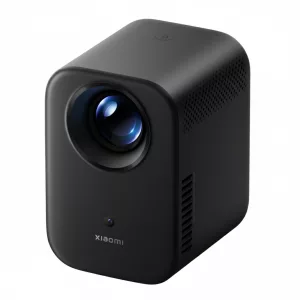


WANBO MOZART 1 PRO 1080P 900ANSI Android 11 Smart Home Theatre Projector - Dark Blue
Out of Stock