
OWC 21.5" 2011 iMac SSD DIY Kit with Tools
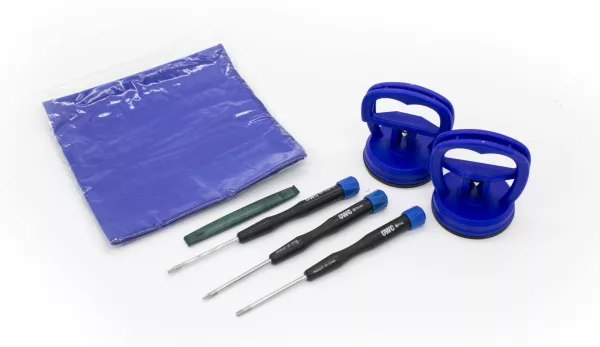
iMac to SSD SATA 3Gb/s data cable iMac to SSD/HDD power "Y" cable 2 suction cups for the outer glass removal Thermal safe adhesive mounting set Newer Technology 11 Piece Toolkit NewerTech Microfiber Pro Cleaning Cloth
Get Notified When Available
Enter your email and we'll notify you when this item is back in stock.
Frequently Bought Together
The Data Doubler SSD/2.5" Hard Drive Installation Kit from OWC/Other World Computing enables you to add a second internal 2.5" SATA hard drive or a high-performance solid-state drive to complement your existing internal factory drive. The installation kit comes with two set screws, four hex screws, four rubber grommets, a Mac mini flex cable, and an installation toolkit. This kit is compatible with Mac mini 2011 and 2012 models.
Product Highlights
- iMac to SSD SATA 3Gb/s data cable
- iMac to SSD/HDD power "Y" cable
- 2 suction cups for the outer glass removal
- Thermal safe adhesive mounting set
- Newer Technology 11 Piece Toolkit
- NewerTech Microfiber Pro Cleaning Cloth
| Brand | OWC |
| Colour | - |
| Form Factor | - |
| Interface | - |
| Capacity | - |
| Memory Capacity | - |
| Screen Size | - |
| Resolution | - |
| Refresh Rate | - |
| Cpu | - |
| Cpu Socket | - |
| Warranty | 12 Months |
No reviews yet. Be the first to review this product!
Related Products


Share this product
' + '' + '' + ''; modal.appendChild(content); function closeModal() { if (modal.parentNode) modal.parentNode.removeChild(modal); } modal.addEventListener('click', function(e) { if (e.target === modal) closeModal(); }); content.querySelector('[data-action="close-modal"]').addEventListener('click', closeModal); var copyBtn = content.querySelector('[data-action="copy-link"]'); var copyLabel = copyBtn.querySelector('.btn-label'); copyBtn.addEventListener('click', function() { function flashLabel(text) { var prev = copyLabel.textContent; copyLabel.textContent = text; setTimeout(function() { copyLabel.textContent = prev; }, 1800); } if (navigator.clipboard && navigator.clipboard.writeText) { navigator.clipboard.writeText(url) .then(function() { flashLabel('Copied!'); }) .catch(function() { flashLabel('Press Ctrl+C'); }); } else { // Legacy browser fallback — execCommand still works on http: contexts var ta = document.createElement('textarea'); ta.value = url; ta.style.position = 'fixed'; ta.style.opacity = '0'; document.body.appendChild(ta); ta.select(); try { document.execCommand('copy'); flashLabel('Copied!'); } catch (e) { flashLabel('Press Ctrl+C'); } document.body.removeChild(ta); } }); document.body.appendChild(modal); }