
OWC
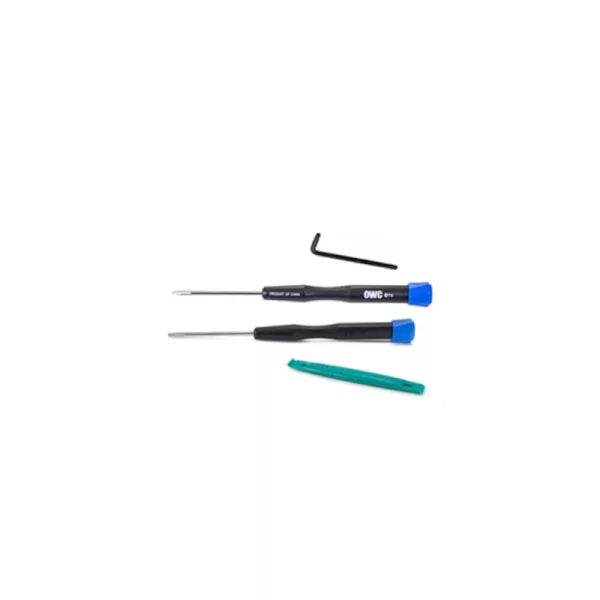
OWC Memory Installation Toolkit for Mac Mini 2018
R 105.17
Out of Stock
Install new ram to your Apple device with OWC's Memory Installation Toolkit. This kit comes with four varying tools designed for use with the Apple Mac mini (2018).
Get Notified When Available
Enter your email and we'll notify you when this item is back in stock.
Free shipping over R 3 450.00
Secure checkout
14-day returns
Expert support
Secure payment — PayFast & Yoco · 256-bit SSL encrypted
Frequently Bought Together
+
+
+
The OWC Memory Installation Toolkit has the right size tools install memory into your Mac mini (2018). This kit consists of the four high quality tools; one key, two screwdrivers and a pry tool.
Features:
- Four in one toolkit for Apple memory installation
- Two torx screwdrivers
- One torx key
- One pry tool
Specifications:
- Compatible with Mac mini (2018)
What's In The Box:
- Torx T10 L key x1
- Torx T6S screwdriver x1
- Torx T5 screwdriver x1
- NewerTech pry tool x1
| Brand | OWC |
| Colour | Black |
| Form Factor | - |
| Interface | - |
| Capacity | - |
| Memory Capacity | - |
| Screen Size | - |
| Resolution | - |
| Refresh Rate | - |
| Cpu | - |
| Cpu Socket | - |
| Warranty | 12 Months |
0 reviews
No reviews yet. Be the first to review this product!
Related Products


Share this product
' + '' + '' + ''; modal.appendChild(content); function closeModal() { if (modal.parentNode) modal.parentNode.removeChild(modal); } modal.addEventListener('click', function(e) { if (e.target === modal) closeModal(); }); content.querySelector('[data-action="close-modal"]').addEventListener('click', closeModal); var copyBtn = content.querySelector('[data-action="copy-link"]'); var copyLabel = copyBtn.querySelector('.btn-label'); copyBtn.addEventListener('click', function() { function flashLabel(text) { var prev = copyLabel.textContent; copyLabel.textContent = text; setTimeout(function() { copyLabel.textContent = prev; }, 1800); } if (navigator.clipboard && navigator.clipboard.writeText) { navigator.clipboard.writeText(url) .then(function() { flashLabel('Copied!'); }) .catch(function() { flashLabel('Press Ctrl+C'); }); } else { // Legacy browser fallback — execCommand still works on http: contexts var ta = document.createElement('textarea'); ta.value = url; ta.style.position = 'fixed'; ta.style.opacity = '0'; document.body.appendChild(ta); ta.select(); try { document.execCommand('copy'); flashLabel('Copied!'); } catch (e) { flashLabel('Press Ctrl+C'); } document.body.removeChild(ta); } }); document.body.appendChild(modal); }